
How to Find Appliance Model Number Fast: 2026 Guide
Posted by Editorial Team on
Table of Contents
- What You'll Need Before You Start Looking
- Where to Find the Appliance Model Number on Every Major Appliance
- How to Read Appliance Data Plates, Compliance Plates and Rating Labels
- Appliance Serial Number vs Model Number: What's the Difference?
- What to Do When the Model Number Sticker Is Missing, Faded or Unreadable
- Finding Discontinued Appliance Spare Parts Using Your Model Number
- Conclusion: Use the Appliance Model Number to Get the Right Part First Time
- Frequently Asked Questions
Last Updated: October 7, 2026
What You'll Need Before You Start Looking
The appliance model number is almost always on a sticker somewhere on the machine, you just need the right light and a clear view. At Allfix Electrical, we have spent over 40 years helping people track down these labels, and the same spots come up again and again.
Safety First: Power, Water and Access
Unplug the appliance before hunting for labels, pull the plug at the wall, or switch off the circuit breaker if the power point is hard to reach.
For plumbed appliances like washing machines or dishwashers, shut off the water taps first and lay down a towel for drips.
Never squeeze behind a live appliance to read a sticker. If you cannot reach the label safely, stop and get help.
- Switch off power at the wall or breaker
- Turn off water taps for plumbed appliances
- Pull the machine out slowly, watching for hoses and cables
Tools That Make the Job Easier
- A torch or your phone light for dark corners
- A rag to wipe dust off the sticker
- Your phone camera to snap a photo of the label
Where to Find the Appliance Model Number on Every Major Appliance
The model number sits on a compliance plate or sticker, and the location changes with each appliance type, and often with the configuration within that type. Here is an appliance-by-appliance checklist of the variations we see most often.
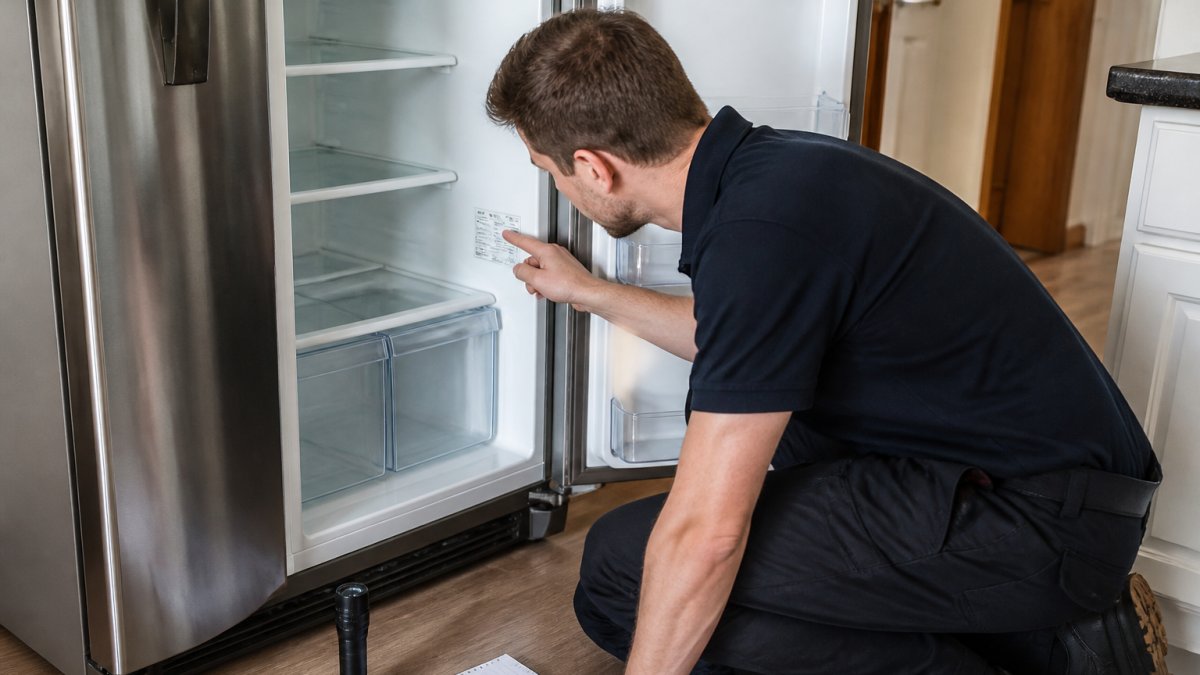
Refrigerators and Freezers
Start inside the cabinet: check the inner left wall, inner right wall and back wall. If the plate is not there, work through the variations:
- Side-by-side fridge: check the inner wall of the fridge compartment, then the freezer compartment wall.
- Top-mount or bottom-mount fridge: check the inner walls, then the frame behind the crisper or vegetable drawer.
- Upright freezer: check the inner back wall and the inner side wall.
Other common spots across all fridge types:
- Behind the vegetable drawer or crisper
- On the base, behind the kick panel
- On the rear panel
Washing Machines and Dryers
- Front loader: open the door and check the rim around the opening, then the inner door edge. If not there, check the small hatch or filter door on the front panel.
- Top loader: lift the lid and check the frame around the opening, then the inner rim of the drum housing.
- Dryer (front load): open the door and check the door rim, then the rear panel.
Backup spots for both washers and dryers:
- Behind the small hatch on the front panel
- On the rear panel
- Under the lid on top loaders
Ovens, Cooktops and Dishwashers
Ovens hide the plate in predictable places:
- Freestanding oven: open the door and check the frame around the opening, then the storage drawer at the base.
- Wall oven: open the door and check the frame, then the side trim or the base of the cavity.
- Built-in oven: check the frame around the door opening and the rear of the cavity.
Cooktops vary by fuel and mounting:
- Gas cooktop: lift the appliance slightly or check underneath the base; also check the rear edge.
- Electric or induction cooktop: check underneath the base and the rear edge.
Dishwashers differ between integrated and freestanding units:
- Freestanding dishwasher: open the door and check the edge of the inner door panel, then the side of the inner door.
- Integrated dishwasher: open the door and check the edge of the inner door panel, then the side panel or the base behind the kick plate.
| Appliance | First Place to Check | Backup Spots |
|---|---|---|
| Fridge or freezer | Inner left wall | Vegetable drawer, rear panel, base |
| Washing machine (front) | Inside the door rim | Small hatch, rear panel |
| Washing machine (top) | Frame under the lid | Rear panel, side panel |
| Dryer | Inside the door | Rear panel, base |
| Oven (freestanding) | Door frame | Storage drawer, rear |
| Oven (wall) | Door frame | Side trim, cavity base |
| Dishwasher (freestanding) | Inner door edge | Side panel, base |
| Dishwasher (integrated) | Inner door edge | Side panel, kick plate |
| Cooktop | Underside of base | Rear edge |
Small Appliances and Less Common Units
For smaller appliances, the plate is usually on the base or rear:
- Microwave: rear panel or inside the door frame.
- Range hood: underside of the unit or inside the filter housing.
- Air conditioner (split system): indoor unit side panel and outdoor unit side panel, check both.
If the plate is not where this guide says, check the manual, most manufacturers print a location diagram in the first few pages.
How to Read Appliance Data Plates, Compliance Plates and Rating Labels
A data plate is the metal or plastic label fixed to your appliance listing the brand, model, serial number and electrical rating.
The Fields You Will See, and What Each One Means
Read the plate left to right and top to bottom. You will usually see:
- Brand name, the manufacturer or the brand the appliance is sold under. These are not always the same; some appliances are made by one company and badged by another.
- Model number, often marked "Model", "Mod", "Model No." or "Type". This is the identifier you need for parts and manuals.
- Serial number, marked "Serial", "S/N", "Ser. No." or "No.". This is unique to your unit.
How to Tell Model, Serial, Product and Part Numbers Apart
This is where most people go wrong, the four numbers look similar but do different jobs:
- Model number, shared by every unit of that exact design. Use this for parts, manuals and warranty registration.
- Serial number, unique to your machine. Use this for warranty claims, service history and recall checks.
- Product number, a manufacturer's internal reference. It may map to a model, but it is not the model number and should not be used to order parts.
A quick way to tell them apart: the model number is usually shorter and alphanumeric, while the serial number is often longer and may include a date or production code. The model number also appears on the manual and the manufacturer's website product page. Similar logic applies when identifying battery specifications, as these codes follow a distinct structure that separates individual power cells from their broader device counterparts.
Reading a Faded or Low-Contrast Plate
Older plates fade, and some use low-contrast ink. Try these techniques:
- Wipe the plate with a damp rag to remove dust and grease.
- Shine a torch across the surface at an angle rather than straight on, raking light reveals faint print.
- Photograph the plate with your phone, then zoom in on the image. The camera often picks up detail your eye misses.
- If the plate is metal and the print is stamped rather than printed, hold a piece of paper over it and rub gently with a pencil to lift the impression.
Write the model number down exactly as it appears, including any letters, digits, slashes and hyphens. One wrong character can send you the wrong part. Take a photo as backup.
For electrical safety and rating information, the Electrical Regulatory Authorities Council sets the rules that govern how appliances are labelled and approved for sale.
Appliance Serial Number vs Model Number: What's the Difference?
The model number tells you which product you own; the serial number tells you which individual unit you own. Mixing them up is one of the most common mistakes we see.
When you order spare parts, the model number decides what fits. The serial number matters for warranty claims, service history and recall checks.
- Model number: the product type, shared across many units
- Serial number: your specific unit, unique to your machine
- Part number: the code for a single component, not the whole appliance
What to Do When the Model Number Sticker Is Missing, Faded or Unreadable
A missing or worn label does not mean you are stuck. There are several ways to recover the number.
Try these steps in order:
- Wipe the plate with a damp rag. Dust and grease hide a lot.
- Shine a torch across the surface at an angle to reveal faded print.
- Check for a second label inside a door, drawer or hatch.
- Look at the manual or any paperwork that came with the appliance.
- Check your purchase receipt, warranty card or email order confirmation.
- Contact the manufacturer with the serial number if you have it.
If the label is truly gone, the brand and serial number can often be enough for the maker to trace the model. Our team at Allfix Electrical can help narrow down the right part when the plate is damaged.
Finding Discontinued Appliance Spare Parts Using Your Model Number
Finding discontinued appliance spare parts comes down to one thing: an exact model number.
Search the full model number, not a shortened version, then check whether the part has a superseded number, a newer code that replaces the old one.
A few practical tips we have picked up over the years:
- Search the complete model number, including any letters and slashes
- Ask whether the part has been superseded by a newer code
- Check that the part suits your exact model, not just the brand
Some parts are universal and fit many models. For guidance on product safety and recalls, the ACCC Product Safety keeps a public register worth checking.
Conclusion: Use the Appliance Model Number to Get the Right Part First Time
Tracking down a model number can feel like a chore, especially when a label is faded or hidden.
If you are stuck, Allfix Electrical can help. We bring over 40 years of experience, a huge inventory of parts for major and minor appliances, and fast handling times, typically 1 to 5 business days.
Search our range with your model number and get the correct part the first time.
Frequently Asked Questions
Where is the model number typically located on an appliance?
It varies by appliance type. On fridges and freezers, check the inner left or right wall, the vegetable drawer frame, or the rear panel. Washing machines usually carry it on the inside of the door, the rim behind the door, or the back. Ovens and cooktops often have it on the frame behind the oven door or underneath the unit. Dishwashers usually show it on the side of the door or the inner door edge.
Are serial numbers the same as model numbers?
No. The model number identifies the product type or series, so every unit of the same design shares it. The serial number is unique to your individual unit and helps with warranty claims, service history, and recalls. When you order spare parts, the model number is what matters for compatibility. Always copy both down for your records, but quote the model number to your parts supplier.
How do I find the model number if the sticker has faded?
Try a few fallback methods. Shine a torch at an angle across the plate; the raised print or residue often becomes readable. Check the owner's manual or any paperwork left by the installer. Look inside the door, behind the kickplate, or on the rear panel for a second label. If nothing works, take clear photos of the appliance and any remaining label fragments and send them to a parts specialist who can identify the model from the design.
Why is the model number essential for ordering spare parts?
Manufacturers change internal components between model runs, even when the appliance looks identical. A filter, belt, or heating element that fits one model may not fit another from the same brand. Giving your supplier the complete model number, including any letters and slashes, lets them check parts compatibility and supply the correct replacement. It also helps when finding discontinued appliance spare parts, because the model number links to superseded part numbers and compatible alternatives.
Share this post
- 0 comment
- Tags: appliance model number, appliance serial number vs model number, finding discontinued appliance spare parts, how to find appliance model number, how to read appliance data plates
0 comment